Case study
keyword search optimizer.
Helps content teams start keyword research from the gap. One seed keyword becomes forty intent-clustered ideas with real Google signals, shown next to what's already published.
- Role
- Product owner & builder
- Type
- Internal SEO tool
- Companion to
- SEO Content Engine
The spark
Built the day after the SEO Content Engine, as its research companion: the engine answers "how do we write this", but not "what should we write about". Six weeks later came the second question: are we writing about the right things? That led to a stats view that puts what we've published next to what people search.
The problems to solve
- P1
The content engine could not say what to write about
Drafting started with no research step to decide which topics were worth writing about.
- P2
LLM brainstorming alone suggests keywords nobody searches
An LLM on its own produces keywords that sound plausible but that nobody types into Google. Without real search signals, there is no way to tell which ones are worth writing.
- P3
Search data alone is a flat list with no intent
Raw search data gives a flat list of keywords. It does not say what each searcher wants, so it cannot guide what kind of article to write.
- P4
No view of published work next to what people search
Six weeks in, a second question came up: are we writing about the right things? Without what had already been published sitting next to what people search, the team could not see which keyword to write next.
How it works
- 01
Brainstorm
Claude returns 40 ideas per seed keyword, each with an intent label and a one-line rationale.
SolvesP1
- 02
Enrich with Google data
Optional SerpAPI enrichment merges in autocomplete suggestions, related searches and People Also Ask, and scores each keyword 0–100: +40 if it appears in autocomplete, +30 if it's a People Also Ask question, up to +30 for how many related searches the seed has.
SolvesP2
- 03
Cluster & flag
Keywords group into Informational / Commercial / Transactional / Navigational; anything phrased as a question (what, how, is, does…) is flagged as an FAQ candidate.
SolvesP3
- 04
Compare with what's published
A stats tab reads the SEO Content Engine's article sheet, classifies each published focus keyword's intent, and charts intent mix, sources and trend, with caching so repeat runs don't re-classify.
SolvesP4
Product decisions
SerpAPI is optional, on purpose
The tool has to be useful with just one API key. Search data makes it better but isn't required, and the free tier is only 100 searches a month.
SolvesP1P2
A score anyone can audit
Strength is a published formula over real Google signals. When someone asks "why is this a 70?", the answer is one sentence. The question flag is a cheap rule too, with its one known blind spot written down.
SolvesP2
Fail soft, per tab
If the published-stats sheet can't be read, only that tab shows an error. The research tab keeps working.
SolvesP4
Built with
Demo
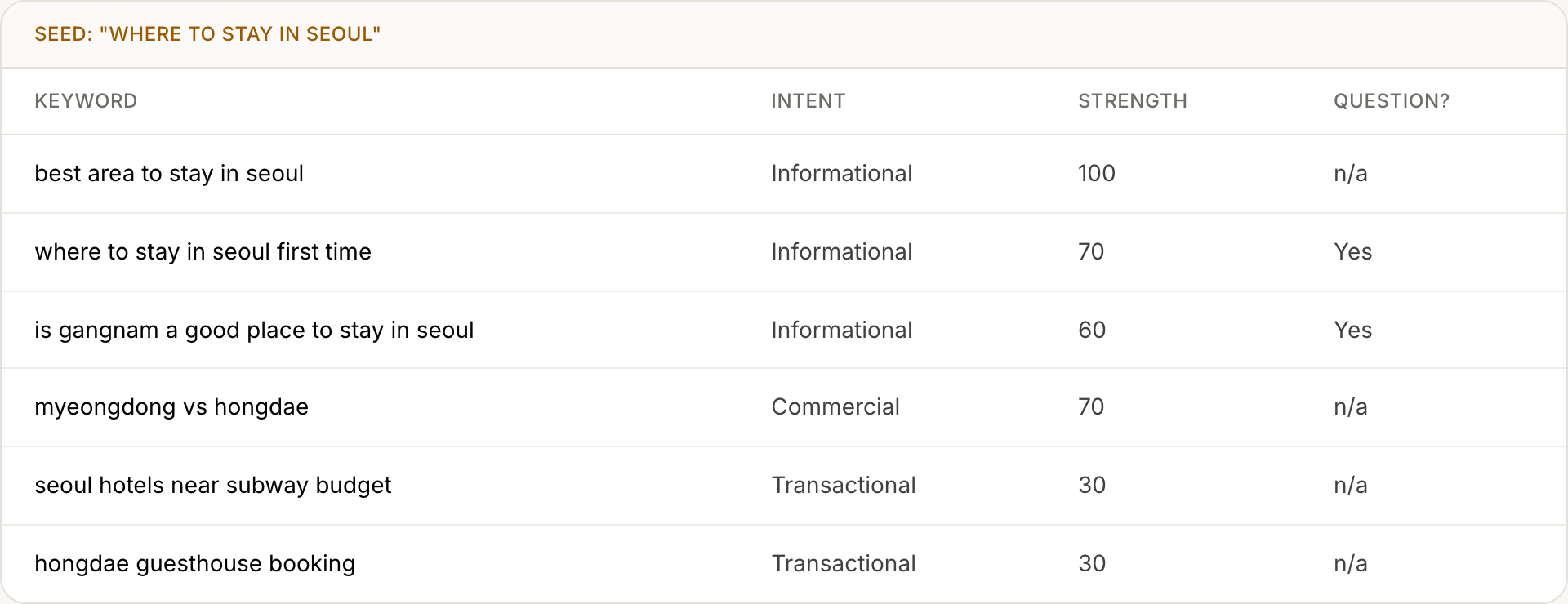
The tool runs locally in Streamlit, so here is an illustrative slice of a research run: scores follow the real formula, with this seed having 6+ related searches.
| Keyword | Intent | Strength | Question? |
|---|---|---|---|
| best area to stay in seoul | Informational | 100 | n/a |
| where to stay in seoul first time | Informational | 70 | Yes |
| is gangnam a good place to stay in seoul | Informational | 60 | Yes |
| myeongdong vs hongdae | Commercial | 70 | n/a |
| seoul hotels near subway budget | Transactional | 30 | n/a |
| hongdae guesthouse booking | Transactional | 30 | n/a |
Outcome
Keyword research went from a list to a gap analysis: what people search, what intent it serves, and whether we've already covered it. Export to CSV in one click.